
M T Mabowels
Members
-
Joined
-
Last visited
-
I’m in the Paititi cave. Etzli is waiting for me to speak to him. If I do, I have been told that 'Fast Travel' will be disabled. So I guess this means I am coming to the end of the game. So, do I play all the DLC Tombs and such now, or would it be better if I wait until the end of the next level/the game?
-
I remember that series, particularly the theme tune. I believe that it was showing at about the same time as Knight Rider if I recall correctly. Pity. 74 is no age these days. I wonder what he has been up to since Airwolf. I don’t recall him being in anything else. Anyone remember Manimal?
-
Yes, that must be it. I've just got Fast Travel enabled. Will be interesting to see if it still appears and under what circumstances. Cheers
-
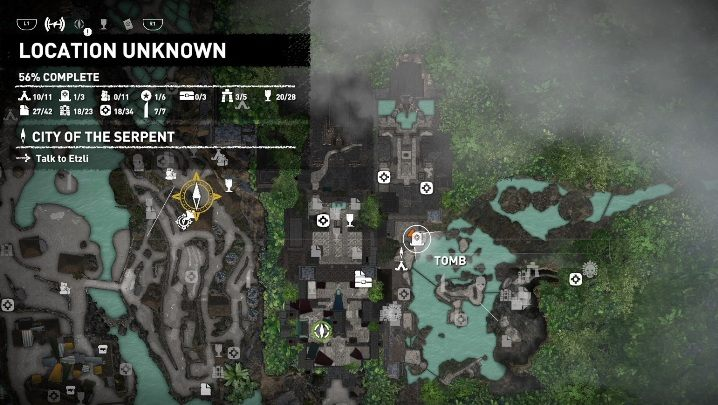
Hi. Thanks for your reply. It's not the large one with the yellow rose around it that shows one where to go next, it's a modified white base camp icon with a smaller Compass needle (without the yellow rose) above it. It seems to be only the base camps that I have just used and left behind that have it. This image has one you can look at, just to the right of the middle near a tomb entrance with a circle around it -
-
I note that some base camp icons have a small compass needle icon hovering over them. Particularly those I have just left. I'm puzzled by this. Does anyone know what the small compass icon signifies? It doesn't appear to make any difference to anything in the game as far as I can tell.

LARA CROFT ONLINE TOMB RAIDER HOME PAGE
© Lara Croft Online All rights reserved. "Serving Tomb Raider Fans Since 2001"
Lara Croft ® and Tomb Raider ™ are trademarks of © CDE Entertainment Ltd. All rights reserved.