
carrollyim
Members
-
Joined
-
Last visited
Everything posted by carrollyim
-
Did you put the sundial "arrow" to the sundial? Move the sundial to 11, then 7. It will open the gate to the maze. Grapple is in the center of the garden. Don't ask... By some method...
-
I got a grapple, I can't cut the rope on the balcony in the "construction site", I can't get up there. ...can't get a pass.
-
Please tell me how I should press the keyboard to perform the run. I don't have the grappling hook, however... I have a Map and a dual handgun only... This is the first level of TR anniversary, like a training... I stuck on this, can't go to the Peru level.
-
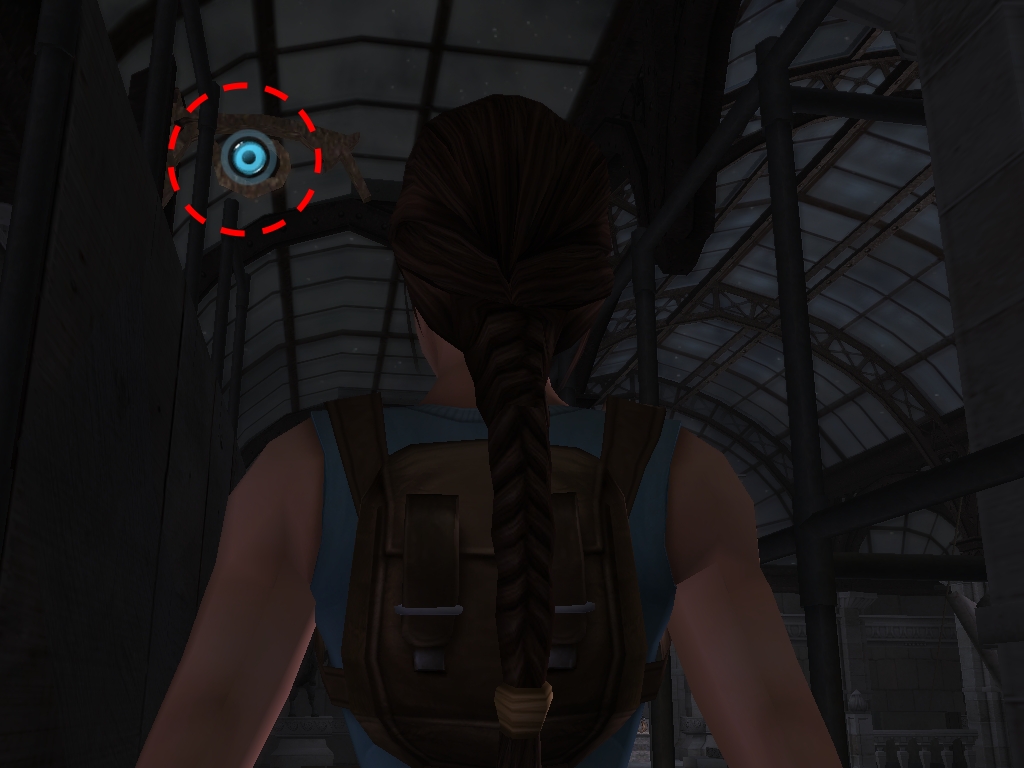
I want to ask what the blue-eye-like icon mean (I circle with a red circle) And What is wall running and grappling hook... the image File is attached

LARA CROFT ONLINE TOMB RAIDER HOME PAGE
© Lara Croft Online All rights reserved. "Serving Tomb Raider Fans Since 2001"
Lara Croft ® and Tomb Raider ™ are trademarks of © CDE Entertainment Ltd. All rights reserved.