
Mike
ModRaider
-
Joined
Everything posted by Mike
-
Thanks Tom! My QuickTime has problems with it anyways!
-
Hehe, I seen a video of her like that. Classic!
-
I am definitely waiting on yours.
-
MAJOR SPOILERS! The end boss. Palace Midas (HOT ROOM!) The Midas Touch! Queen Natla! http://youtube.com/watch?v=W3lqOEH5bF4 Larson's Death and pixiled Lara! http://youtube.com/watch?v=ouoNo_7eLEk&...ted&search= Sanctuary Of the Scion Cutscean http://youtube.com/watch?v=frj4FdEW1EU&...ted&search= 2 Centaurs Boss
-
It does not officially hit stores until June 1st (June 5th for US). Therefore, please hold back until posting until that date.. If you need help with the game, post in the appropriate help thread June 1st. Thank you. thread closed
-
There is already a Forum FAQ pinned here and in Announcements. I even added those Q&A to the list. Therfore I'm going to closed this thread. If you have any further questions just PM a mod. thread closed
-
Ok I remember Kolt! I never got to Bacon Lara. OK here's .
-
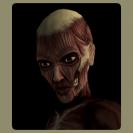
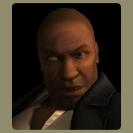
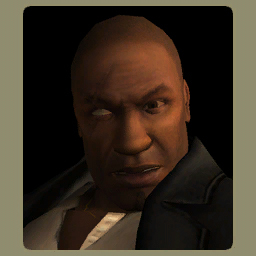
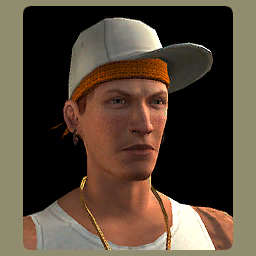
The below screen shots are characters that are confirmed to be in the game (besides Larson, Pierre, Lara and Natla!). Possible Spoilers below. ******* Don't Look If You Don't Want Too ********** Bacon Lara: Kolt? Skater Kid: Ok I hear people talk about "Bacon Lara", but who and where is she? Also WHO is the black guy? Source: Eidos Forum

-
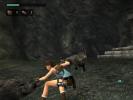
Ouch!
-
Now to work on the artifact.
-
Me either.
 Offtopic. Alantis is NOW The Lost City!Yes you're right. The only problems I am having is because I'm not a PC player. I don't know how many times I died just going up the first lader tryin to make it across. LOL. When the real game comes out on PS2, I'll like it a lot more.I hope it'll be better on the PS2.I knew it would run on Vista, just wondering if it would on 64 bit. It does though.I played. Do not like it on the PC. The keyboard is too hard. Sometime I missed the second cog, and went straight to the Lost Valley, lol. Overall I will love it (on the PS2!).Only 2/3? Is this how the demo is? Thanks! BTW, does anyone know if it will run on (Vista) 64 bit??So anybody know if the cheats are out? Does anybody know what the cheats are?OMG everybody get off the site! You're making it go to slow. Really there must be A LOT of people there.5 mins!!!1 hour and 50 mins left! I'm pissed too, my satellite is on FAP, (I have ProPlus), so I wont get to download until that's cleared up. I'll hit FAP again when I do download it. Jeez, I hate satellite sometimes!Does anybody know how big the file will be? 300-600MB?LCO Forum F.A.Q. Q. What are the Benefits to Registering on the LCO forums? A.To be able to use all the features on this board, we require that youregister for a member account. Registration is free and only takes amoment to complete. Benefits of Registration Once you have registered and logged in, you will have access to your private messenger and your control panel. You are able to actively participate in our popular community forums. You can post & reply to topics and polls. You can SEARCH LCO Forums You can EMAIL members via forum Access to the LCO Flash Chatroom. Q. How do I sign up for a account? A. To register click HERE Q. I signed up using the wrong email address. What do I do? A. If you signed up using an email account that you can't access, please contact an LCO Admin. Please DO NOT make a new account it will be deleted and you may be warned. Q. Am I allowed more than one account? A. LCO members are only permitted ONE member account. If you have more than one account, contact an LCO Admin immediatelyto rectify the situation. It is in your interests to let us know(privately) as anyone found to have more than one account may have theaccount blocked or deleted without notice. Q. Can I change my forum nick-name? (account name) A. Yes. Open your Control Panel by clicking My Controls. Under Personal Profile, click Change Display Name. Q. What are the Member Titles & how can I change mine? A. The Default Member Titles are based on your post count. You can also change your Member Title in My Controls then click Edit Personal Information. You can change your member title there. Q. What are the stars for and how many posts do I need to increase the amount of stars in my profile? A.The stars (also called "pips") give a simple graphical representationof your post count. It makes it easier to see who has posted a lot inthe forums. Be aware though, you shouldn't place any difference betweenmembers based on Post Counts or Stars alone. 0-9 posts - 1 pip 10-29 posts - 2 pips 30+ posts - 3 pips Note:Your Contribution to LCOs forums isn't based on a high post count orlots of stars. Regular and long term members base it solely on yourconduct and the quality of your posts. Also if you abuse this, we havethe right to remove your post count from showing. Q. How do I add attachments to threads? A. Under Attachments, in the "full reply" window, you'll see a "Browse" button. Click that and find the image on your PC you wish to add. Click the Upload button. Click Manage Current Attachments,and on the attachment you would like to post, click to add it and to delete it. Please keep in mind that the maximum single upload size is 2MB. Each member has a maximum storage level of48.83MB. Once you have used all of your free space you will no longerbe able to add attachments. You can go into your Control Panel anddelete old attachments to free up space. Q. How do I add sigs? UPDATED A. First if you do not yet have a sig and do not know how to make one, please visit The Sig Stationand you may request for one. One of our many talented members will bemore than happy to make you one of your choice, if all is possible.Once you have your sig file saved on your computer, go to your ControlPanel. Under your menu, look below Personal Profile and click on Edit Signature. If you're just adding text, then you can type what you wish (just like a post). To add images, click on the "Insert Image" button and put in the URL of where your sig is hosted (photobucket, tinypic, etc). When you're done click Update My Signature. Pleasekeep in mind rule number 9: Signatures are to be a maximum dimensionsof 500 x 250 with a maximum size of 500kb. While there is no limit tothe number of signature pictures, don't go too overboard. Q. How do I add an avatar? A. Go to your Control Panel and under Personal Profile click on Edit Avatar Settings.We have many avatars already pre-installed. In case you would like toadd your own, just click on Browse to find your avatar on yourcomputer, then click Update Avatar. Pleasekeep in mind that the max avatar settings are 20kB and 128x128 (thesystem will scale it down to 128x128 so make sure it's a small avataror it may end up looking distorted). Please make sure the avatar is notor could not be in any way offensive or distracted to members (graphic,flashy .gif image, nudity, profanity). If you fail to change it whenasked, we will change it for you and you may have your profile takenaway! Q. How do I add a personal photo of my self in my profile? UPDATED A. Go to your Control Panel and under Personal Profile click on Change Personal Photo. Click Browse to find your photo of choice. Click Update Photo when done. You may also post a pic in the Official Member Pics thread, and it will be added to the gallery soon after. Rememberto not add any offensive photos! The max size of a photo is 100kB andshould be no larger than 150x150 (it will be scaled down to this size). Q. I've been warn, now what? A.A warning means that you've broke one or more rules (or one of the USlaw, as that is where the forum servers are located. Laws such aswarez, etc ). If you've been warned, then you will most likely receivea PM stating why. If not, please PM a Moderator or Admin. Do NOT make a thread asking about your warning level. It will be deleted, and you may be warned again. Ifyou've been warn that does not mean "we" (the Moderators/Admins) do notlike you or we don't want you here. It simply means that you didsomething wrong and we're just "letting you know". Most people learn from their mistakes, and this is a way of sort of -- showing you. Q. What happens if my warn level reaches 100%? A.If the warn level reaches 100%, the member will be suspended fromposting for a period of time, if they have to be warned again, thenthey will be banned completely from the site. Q. Will my warn level ever go down? A. Over time, and if you prove that you can follow the rules, your warn will gradually decrease. Q. Can other people see my warning level? A. No. YOU can only see your own. Q. How do I report an offensive post? A. Below each post you should see a "Report"button. Please only use this to report an offensive post only, and notto communicate with the mods -- we do not answer back. Use PM for that. Q. How do I change the color / look of the forum? UPDATED A.In the lower-left corner of the forums at the very bottom, there is adrop-down box entitled, "Select a skin:" You may choose a skin stylefrom there. We currently have 6 'main' skins for you to choose from. Tom adds and deletes often so check to see if any new ones are loaded. Currently they include, but are not limited to: The Default Skin Mocha 1.2 XGaming 0.3 IP. Board Pro 360 Style (Xbox) XGaming 0.3 IBSkin Exclusive Freedomtech Q. Where can I see LCO's forum rules? A.The LCO Forum Rules are pinned on every forum in the Announcementssection. They are updated from time to time, so be sure to check often,you can view them here. LCO's Active Staff Users Guide LCO's administratorsare the founders behind our community. They are responsible forcreating content for the site, and making overall decision for the goodof the site. Administrators are to be contacted in the followingregard: If you have an issue with how you were moderated If you have an issue with the site Administratorsare the highest level of staff here at LCO. They have the ability to doeverything the Moderators can plus more. You can identify them by thecolor blue below there name. They include: Tom@LCO (Admin & Founder) Gia@LCO (Asst. Admin & Co-Founder) BPanther (Tech Admin) Raekwon (Tech Admin) UPDATED LCO Moderatorsare members of staff who are assigned to various forums here at LCO.These staff members primarily moderate those assigned forums only. LCOModerators have the capabilities to move threads, merge threads, splitthreads, pin threads, delete threads, close threads, delete posts, editposts, edit polls, and edit post titles. In disciplinary moves, LCO Moderators can warn members, edit a member's profile, avatar, and signature. LCO Moderatorscannot change a member's account at all. LCO Moderators must conferwith LCO Admins on discipline that merits a ban from LCO altogether. Thefollowing LCO Moderators are currently active at LCO, and should youhave a question in how your post was moderated or anything at all, please PM one of them (it's preferred that you PM the mod that issued the warning). You can identify a LCO Moderator why the color green in there name. They include: AJ=TR Angelaian AngelR Cliffy Kratos Lara Man Mike Ms. Croft Stellalune Shrensh TR252 Q. Can I be a mod? NEW A.No. Please do not ask to become a mod. Mods are carefully chosen by thestaff. When we need extra help, you will be PMed if chosen. DO NOT ASK! Last updated: 12/1/08 - Added new forum main theme, updated the mod list, updated info & added question.



LARA CROFT ONLINE TOMB RAIDER HOME PAGE
© Lara Croft Online All rights reserved. "Serving Tomb Raider Fans Since 2001"
Lara Croft ® and Tomb Raider ™ are trademarks of © CDE Entertainment Ltd. All rights reserved.