
Pahkasika
Members
-
Joined
-
Last visited
Everything posted by Pahkasika
-
Doesn't seem to work... I've tried pressing the look key from <1s to up to 10s and still Lara wont look, just the normal controls. EDIT:... why didn't I try defaulting the controls first. Works now, though I still have no idea how can I erase the config for the look if it's not even configurable. Moar bugs plz
-
How do I look in TR AoD? I'm playing on my comp and the default 0 on the numpad does nothing. And I've looked about 10 times in the controls, and I don't see a way to assign it to any button either. Known bug or something else
-
Well I finally bought it. Looks like there are no Gold levels, but it's a nice collection anyway (+ of course I had only TRI&II for PC previously, and II-V for PSX). And it definitely looks good on my shelf
-
Hi there, I just saw THIS in my local store for just 19,90€. Has anyone got it? What I'd like to know is if it contains TRI-III Gold levels as well? (Mobygames says it does, didn't find the same info on any other page). Cheers
-
I've been playing the demo for a few days now, and based on that, I'm not going to buy the full game. Some pros and cons, based purely on the demo: + Graphics. Looks sweet and runs pretty decently even on my machine (A64 3000+, GF6600GT, 1Gb 400MHz DDR) + Sounds + Music. Just perfect. + Atmosphere. Even in the short demo you really get into the 'TR-feeling'. + Controls. Lara moves smoothly and even the 'hard' moves are relatively easy. That's about it - Combat. Two things ruin them. a) Absolutely useless camera. It manages to show everything except the thing you should see, ie the enemies. No, I don't want to see a close up of Lara's face, I want to see the bear coming at me. Horrible controls in battle. Umm, you have to rapidly tap the MB1 to shoot even with pistols? You have no idea where Lara is going if you press any direction button (due to the camera). - Moving and jumping. How are you supposed to know, where you can jump and where you can't? In previous games it was so clear what ledge you could reach and where you could climb up. Now it's more like trial and error, and what ruins that tactic, is that... - there's NO load/save. I really hope that this is just in the demo... - Lots of controls not explained in the readme or ingame. How difficult is it to add a text in the options menu that with jump button you also swim up? And I still haven't figured out how to climb up/down ropes. Of course, with the full game you'd have a manual, but still... Overall nice try, but the controls really need some major improvements.
-
I wanted to try TR level editing, so I dowloaded the level editor a few days ago. However, every time I launch it my cpu usage goes up to 100%, meaning that it's totally impossible to do anything with it (especially when I try to read the manual at the same time, takes a lot of time to alt+tab between two windows). I tried running it in Win98/ME compatibility mode, but then it just crashed. So, does LE work at all under Win XP? Specs: AMD A64 3000+ GF6600GT 1024Mb DDR Windows XP SP2
-
#1) I play TR on PC and PS1. #2) Tell us about how you came across TR for the first time. My friend had this cool new game (TR1) and I had to check it out. TR2 demo for PS1 really got me hooked. #3) TR1 was the first TR game I played. #4) TR2 was the first TR game I passed. #5) Name your top 3 favorite TR games. TR3, TR2, TR1, in that order. #6) Which TR game was your least favorite? Why? Gotta be TR4. Mostly because my memory card failed twice after completing about 70% of the game #7) TR5 was the easiest for me because it was so short. #8) TR2 was a challenge for me because it was the first TR I had. #9) How often did you have to use a walkthrough/stratedgy guide? Well, I didn't have to, I just did use. Wouldn't be nice to miss a secret And it made playing TR very social, my best friend or my sister was reading the walkthrough out loud while I was playing #10) Were you always on the hunt and look out for the TR secrets? Yup. #11) Pierre or Larson Larson. #12) TR4 was the creepiest and often made me jump. #13) Which TR game was the one that you enjoyed playing the most? Why? TR3. It just had a fantastic overall atmosphere and I really enjoyed the level desing. Also, the game wasn't very easy so it was a good challenge. #14) The hardest level in TR1 was Atlantis because... have you ever tried to complete it with pistols only? #15) The hardest level in TR2 was Opera House because it was soooo long, at least the first time round. #16) The hardest level in TR3 was RX Tech mines because of the mutants and complexity of the level. #17) The hardest level in TR4 The Last Revelation was the Cairo levels (can't remember any level alone being very hard) because it was just so difficult to manage without walkthrough. #18) The hardest level in TR5 Chronicles was Red Alert because the robots. #19) The hardest level in TR6 The Angel of Darkness was -- never played it. #20) The hardest level in TR7 Legend was -- never played it.
-
-
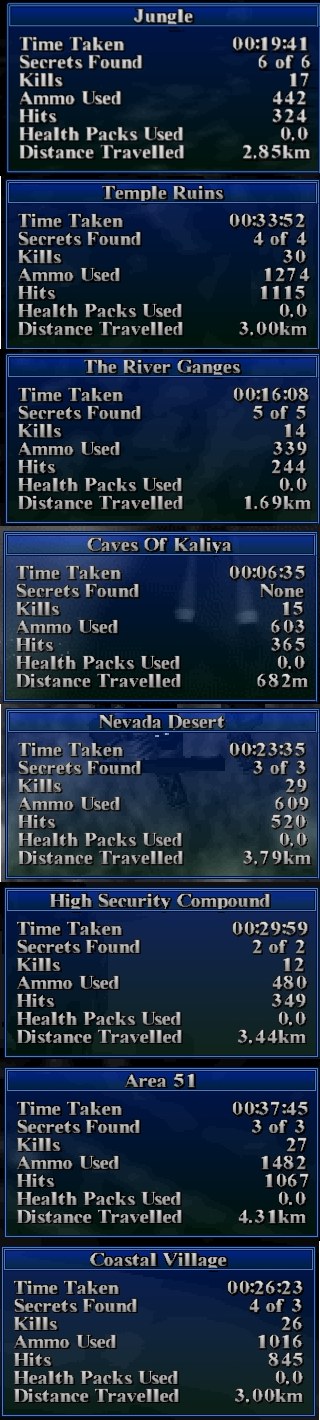
Started my walkthrough project again in the summer, haven't played TR3 for 'bout a month now. Anyway, here are my stats so far... Pistols-only, no medipacks, as few saves as possible (one at the end of each level + some extras on the way) etc.



LARA CROFT ONLINE TOMB RAIDER HOME PAGE
© Lara Croft Online All rights reserved. "Serving Tomb Raider Fans Since 2001"
Lara Croft ® and Tomb Raider ™ are trademarks of © CDE Entertainment Ltd. All rights reserved.