
BPanther
Administrators
-
Joined
-
Last visited
Everything posted by BPanther
-
Thanks Stella!! Now we need more!!! quickkkkkkkkkkkkk!!! BPanther
-
If you place the cam behind you, press S (and keep it pressed) - she should now be looking behind her. Then press jump. Good luck! BPanther
-
I HATE that jump.... I can't do it either in the Croft Manor... :angry: :angry: Maybe one of those things to try with the controller instead... BPanther
-
For someone that likes google maps so much, this is, I must say, a very good moment to use them. Thanks for the info. If I was even near Madrid, I would definitely go there. I'm sure our Spanish fans appreciate the info! Thanks. BPanther
-
These are a few simple guidelines to follow here to avoid the spam issue and keep the forum interesting and entertaining to all. Things may be added at a later date, so check back occasionally. 1. Keep your posts to the topic of the thread. Don't interrupt them to say "hi" to a member, instead use the Private Message feature of the board. And try to make your posts more than one word, although sometimes that is all that's needed, don't make a habit of it, we want to hear your voice (well, read your messages). 2. Read what you have written before you post it. Make sure it makes sense and is readable enough. We all make those bad speelling meestakes once in a while . 3. Before you start a new thread, look to see if there is anything related to the issue already posted. You can also do a search of the forum for a specific topic. If your thread isn't there, get a discussion going (ask questions or for opinions). Just make sure that if it's a debate that everyone's opinion is to be respected. 4. Links to your TR sites are ok and also your forums but it can't be in a post. The link can be in your signature, in your forum profile. People will see it when you post. If you do post a thread it will be deleted without notice. 5. Anyone impersonating a mod or Tom in chat and using their names will be banned from this site for eternity without any hope of ever coming back. Your IP's are recorded and we know who you are. 6. Anything truly obscene or vulgar will be dealt with immediately and the author warned. 7. While the moderators are doing their jobs, if you feel a topic has been closed unfairly don't take a hissyfit. Speak to the moderator over Private Message and discuss it with them to find their reasons and explanations. See, talking always helps =). 8. This forum has got a warning system. This means that moderators can and will use it. You'll receive a Private Message or Email when you get a warning and you can see your warning system under your avatar. You can have 3 warnings in one day. After that, an admin can disable your posting ability or suspend your account. Be sure to follow the rules and instructions given and we won't need to do it. 9. Signatures are to be a maximum dimensions of 500 x 250 with a maximum size of 500kb. While there is no limit to the number of signature pictures, don't go too overboard. Lara will come and get you and hit you... a lot.
-
Th Official Specs from Keir at Eidos U.K. Minimum Specification OPERATING SYSTEM: Microsoft Windows 2000, XP, Vista CPU: Pentium 3 1.4Ghz or Athlon XP 1500+ RAM: 256MB (for Windows 2000/XP) 512MB (for Windows Vista) GRAPHICS: 100% DirectX 9.0c compatible 64 MB 3D Accelerated Card with TnL (GeForce 3Ti / Radeon 9 series) SOUND: Microsoft Windows 2000/XP/Vista compatible sound card (100% DirectX 9.0c -compatible) DVD-ROM: Quad-speed (4x) DVD-ROM drive HARD DRIVE: 4GB free disk space INPUT DEVICES: 100% Windows 2000/XP/Vista compatible mouse and keyboard Recommended Specification OPERATING SYSTEM: Microsoft Windows XP, Vista CPU: Pentium 4 3.0Ghz or Athlon 64 3000+ RAM: 1GB RAM GRAPHICS: 100% DirectX 9.0c compatible 64 MB 3D Accelerated Card with Vertex Shader 2.0 and Pixel Shader 2.0 (GeForce 6000 series / Radeon X series) SOUND: Microsoft Windows XP/Vista compatible sound card (100% DirectX 9.0c -compatible) DVD-ROM: Quad-speed (4x) DVD-ROM drive HARD DRIVE: 4GB free disk space INPUT DEVICES: 100% Windows XP/Vista compatible mouse and keyboard
-
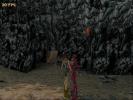
I completely forgot about "Bacon Lara" ( Love the name btw ). Great puzzle in my opinion. I also took a screenshot of it when I was playing TR 1: I called it "Lara's soul mate"
-
Played the demo for the second time... found the shotgun... so well hidden and clever to get to it. But I'm still missing one artefact and the relic. I'm guessing we can find them in the demo? Can any of you pros tell me that? BPanther
-
Hi again Mike! Some options are disabled in this Demo, like the save option. You have the checkpoints anyway but if you quit the game you'll have to start from scratch. The bear room... first I jumped to the top but then the bear hides and it's hard to kill him. So, if you want to get rid of him, jump down and kill it. Once you do that, jump to the top, pick up the ammo and if you look down, you'll see a wooden slope. Jump to it, let her slide a bit and immediately jump and grab, traverse left and then jump back to pick up an artefact. Go back up again, jump to the poles ( left one first, jump to the wall and then back to the pole tops - starting from the left, you'll stand on both poles and jump from the last one to a ledge.) You'll be ok after this! Let us know if you need more help. (merging this thread with the main one). BPanther
-
Hi Mike and welcome to LCO. You can find some tips about the controls Here. Use Shift to swim down and space to swim up. As for the camera, it will take some time till you get used to it. You just have to keep in mind that she'll move to the direction of the camera ( e.g. If she's facing you and you press W - to walk forward - she'll move towards you and not the other way around). Hope that helps a bit, but you can post in that thread for more directions. Again, welcome to LCO and I hope you find all the help you need here. BPanther
-
Thanks for the help! I decided to install the game on a different computer so that I can keep that running and use this one to work. Thanks for the help! BPanther
-
Hi Fusion, We all know it's just a demo but we still want to do everything that can be done! I'm not planning to rush through the game and reach the dinossaurs bit just to say I've done it. Actually, I'll make sure this lasts till the game is out I appreciate if people continue using the secret tags. Even if most people finished the demo already, there's always more people that didn't even start yet or to all the new members of the forum that are joining to ask for help. And while I'm on a more serious note, and not asking for help lol, I'm convinced that most of the problems you're feeling now, won't happen with the full version. Like someone mentioned before, those that are not used to this game in PC version and its controls, will have problems. For us, PC users, the controls are pretty much the same and we don't have problems at all. So, a bit of patience, soon you'll have the game in the platform you love so much. Thanks, BPanther
-
I know where the gate is, I just can't get her to it yet... the current is really strong. Any tricks for this one guys? Also, if I quit the game completely, can I restart from the last check point or I have to do everything all over again? ( I have the feeling I won't like the answer but I prefer to know before quitting the game ) Thanks, BPanther
-
How about swimming up? BPanther
-
Actually... no, it doesn't say that: Wouldn't make any sense to have different levels. BPanther
-
Have fun everyone!!! http://www.laracroftonline.com/flash2/featured_video.html Walkthrough in video is available here or via the menu bar above on the board!!
-
I'll lock this thread now and start one specifically for the Demo discussion!! BPanther
-
257 MB to download! Just to let you know that I'll start a thread specifically for the demo discussion soon and lock this one, ok? BPanther
-
Downloading
-
Less than 1 minute...
-
How about we all go to chat and 'wait' together? BPanther
-
there.. and everywhere.... Can't waittttttttttttttt 20 minutes to go!
-
I'm not sure what to do... I'm really excited but not sure if I'll wait for the full thing! they're so close to each other in time! It's great news though! BPanther
-
*jealous* Good to know how good it is!! No room for disappointment... Not long to go now... yay!!! BPanther
-
What's so special about having what everyone has? Your hand selection is much better! Thanks for posting them. I agree, she looks healthy and happy with Brad. Very nice selection of clothes too. Elegant and discrete and not those weird dresses most people wear for parties like this one! Thanks, BPanther


LARA CROFT ONLINE TOMB RAIDER HOME PAGE
© Lara Croft Online All rights reserved. "Serving Tomb Raider Fans Since 2001"
Lara Croft ® and Tomb Raider ™ are trademarks of © CDE Entertainment Ltd. All rights reserved.