
Itachi
Members
-
Joined
-
Last visited
Everything posted by Itachi
-
Ok, lets see here..... Progress: Enjoying it now. It's a little short for all the time I put into downloading it. I guess the game is better than doing nothing with the crappy first version, but I'd still like the "real game".
-
Ok, I endured the long downloads (thx Gia for helping making it faster), but when I extract any of them, it stops around 40% and says the file is corrupt. Any help?
-
Thx. I caught up and I'm now on the Caves level. I'm saving my "at the end" savegames because it now freezes when I want a screenshot.... Oh well. I'll take a break now.....
-
Now that I'm playing TR3 again, I'm trying to get the "texture glitch" to work.... I'll see if I can. ~~~~~~~~~~~~~~~~~~~~~~~~~~~~~~~~~~~~~~~~~~~~~~~~~~~~~~~~~~~ I cant seem to get it to work..... ~~~~~~~~~~~~~~~~~~~~~~~~~~~~~~~~~~~~~~~~~~~~~~~~~~~~~~~~~~~ Got it now. New ones here. Click on 1st time for new pics.
-
Still on Jungle..... In the place of the two waterfalls and the hidden back area. I'll finish the level soon. BTW, I found all six secrets, so if you want to know about them, they're all before the second zipline. ~~~~~~~~~~~~~~~~~~~~~~~~~~~~~~~~~~~~~~~~~~~~~~~~~~~~~~~~~~~~~~~~~~~~~~~~~~~~~~ Jungle level is complete with 26 saves. I dont think its a bad run, or is it? Also, I killed every monkey I saw. Anyway, I need to know about something in Temple Ruins, If you are past this level, please help. I'm about to enter the area with one (maybe two) staues after returning to the trees above the level start. Someone please tell me whats about to happen please. I had a heart skip when I ran into the snake right before it, so I cant imagine whats going to happen here. Please help.
-
Even at 90kb, I'm pulling 35 minutes for the first part. Could you make a torrent if possible? I love torrents (for anime mostly) for large stuff like this.
-
omg.... Ok, I just crossed the first zipline over the river. I'll try to catch up. In any case, after the Jungle level, its like a WHOLE NEW game to me. Like I've said before, I've never really played a TR game in its entirety before. Time to conquer old fears...! So, please be patient with me.
-
Well, if you could get the level skip to work, you could just skip to the start of the Crimescene level. that way you dont have to go through all that again.
-
Yeah, its my name for it.
-
Ok, I just started... Anyways, I'm in the trees over the second spike pit and I have a sound problem where the music repeats NON STOP. I get a secret and its non stop chimes. *sigh* I hope I can catch up. I haven't really played TR3. (BTW: HELP ME with this sound problme please.)
-
I think I voted TR1, kinda wanted to go in order. Oh well. Anyways, I had an idea on what to call this "project" of ours. "Replay: Tomb Raider" or "TR Replay".
-
I remember that thread. Hectic is was, but I doubt people here wont need help for awhile with the TR Replay going on...
-
Ok, ill go find my TR3 and join you guys. Anyways, you guys remember this little trick?
-
Wii first. Neat idea and its cheaper.... PS3 is my real choice, but I've always loved the games for both consoles in the past. (Only like the Xbox for Halo/2.....) ALso, the good old PC is still going to be a fav too.
-
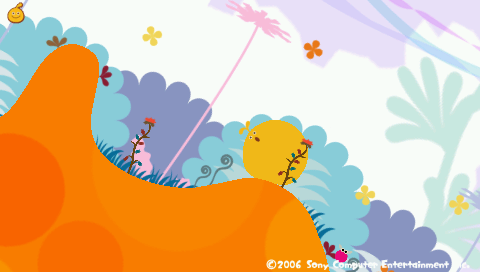
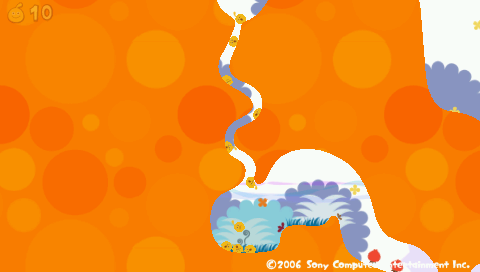
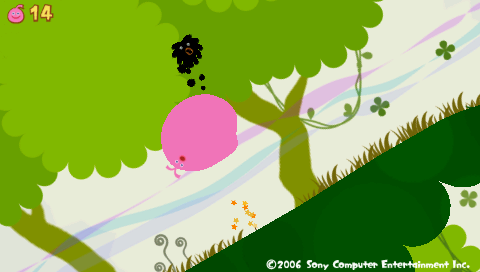
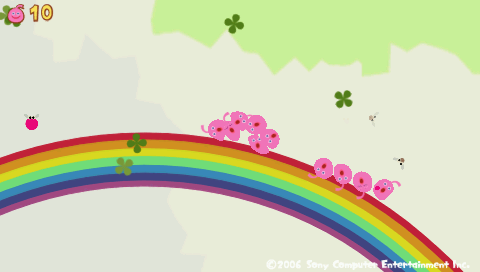
Its a game where you play as the "planet" the peaceful LocoRoco live. One day, a Meteor holding Mojas landed on the planet and they started eating the defenceless LocoRoco. You as the planet must guide them to saftey. L or R ~ Tilt the World L and R ~ Jump Tap O ~ Split up Hold O ~ Come together. A must have, trust me. They sing...... : ) Some self taken pics:








-
A TR1 remake for the PSP. Looks really nice, no, eh, fantasic! I want it. When can i get it. (Going nuts here. )
-
I asked Tom last night about it. Raek is right.
-
Facinated as a 6 year old kid seeing TR1. Held on until now and still on it.
-
Yeah. I dont know why I cant play these games. I'm subconiously scared of enemies coming from nowhere is the problem I think. The jumping/running/etc. is easy enough though. Now that I think about it, I did beat Legend for PS2. Weird not using the PC. Bad news is that I rented it....
-
hahaha....I always look like that when nothing is going on, or when I'm getting my picture casually taken. I'd rather take the pictures then be in them.
-
If I can, I would. The only thing is that I've never "truely" completed a Tomb Raider game. If you care: Came across at young age, had my father play it, got to Midas and turned to gold, had nightmares, and was "scared" to play them "right". So, what about cheats?
-
I first played TR1 when I was 5 or 6. I'm not going to explain the story again. Anyways, my favorites are 2 and 3.
-
-
Well, since this is a new account, I put it in the "New Members" thread, but I am "returning" to LCO. Inuy..... I mean, Itachi is back.
-




LARA CROFT ONLINE TOMB RAIDER HOME PAGE
© Lara Croft Online All rights reserved. "Serving Tomb Raider Fans Since 2001"
Lara Croft ® and Tomb Raider ™ are trademarks of © CDE Entertainment Ltd. All rights reserved.