
Stellalune
ModRaider
-
Joined
-
Last visited
Everything posted by Stellalune
-
Welcome, @Mick! I hope you got some sleep. I couldn't resist squeezing in a little gameplay after listening to a bit of the Tomb Raider Suite on the PAX East Twitch Stream. Did anybody else catch it? I'll post a link tomorrow once the video is archived. So, yeah. Experimenting with a shortcut in the Great Hyposytle Hall when this happened....
-
Welcome to everybody who's joined in the last few days! I probably won't have a chance to play much this weekend. I'll be streaming Rise of the Tomb Raider Endurance co-op with a friend on Saturday afternoon, then watching some other friends' TR 2013 multiplayer stream for Extra Life from 10pm EDT. You're all invited if that's something you're interested in. Then on Sunday I really need to work on my taxes. Sigh! Last night I made some progress in Karnak/Hypostyle Hall/Sacred Lake and discovered one notable new thing, thanks to a tip from a player called CMB1988. When you return to the Sacred Lake to activate the electric obelisks that @CaityFM screencapped, you can go back through the crawlspace in the northeast corner to the main area with the big pool. If you do that, another crocodile appears near the entrance from the Great Hypostyle Hall. In all the times I've played this game, I never thought to try that. I haven't added screenshots to the walkthrough revision but I will do that soon. Have a great weekend, everybody, and keep me posted on your progress.
-
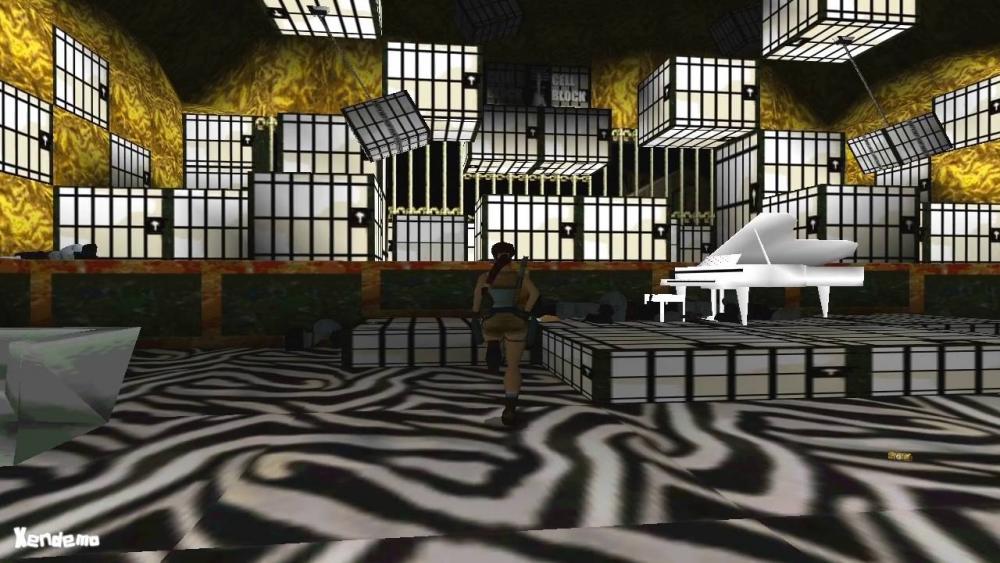
It's the Nightmare In Vegas level from the TR2 Golden Mask expansion. If you haven't played it, it's a free download, but you need the full TR2 game for PC to play, since it uses files from the main game.
-
Haha! Because the designers didn't get enough in the Golden Mask expansion!
-
@Lara_Croft The widescreen patch doesn't affect your save files, so you won't have to start over. If you do have any trouble, I can always send you a save. In case anyone wants to try it, here are basic INSTRUCTIONS FOR THE PC WIDESCREEN PATCH: There are three versions of Ed K's widescreen patch on my site. These instructions cover the MIDDLE one, labeled "Tomb Raider 2, 3, 4 Widescreen Patch - Advanced Version." This version includes the option to adjust the camera distance and field of view but doesn't require a separate program to open .rar files, like the others do. After downloading the patch program (TombRaider234_Patch.exe) move it into the folder where the game is installed. This will be in a different location depending on whether you have the Steam, GOG, or CD version. If you're not sure where it is, search your hard drive for the game program (tomb4.exe). When you find it, right-click it in the search results and choose "open containing folder" or "open file location". Now move the Old_Games_Widescreen_Patch.exe program into the same folder where tomb4.exe is. BEFORE YOU RUN THE PATCH copy your original tomb4.exe file into a new folder. Then if anything goes wrong, or you don't like how the patch looks, you can just copy/paste it back into the original location without having to uninstall/reinstall the game. When you're ready to patch, double-click Old_Games_Widescreen_Patch.exe to run it. A small program window will pop up. Check Widescreen Fix and either tick "Select Aspect Ratio" and choose the ratio that matches your monitor (e.g., 16:9); or tick "Enter Arbitrary Aspect Ratio" and enter the exact value for your monitor (e.g., 1920x1080). If you like you can also tweak the Camera Distance and Field of View by checking the options on the left and entering values in the boxes for each. I have included a few examples below, but you may want to experiment and see what works for you. Once you have made your selections, click the "Go!" button. Then, in the next window, select the tomb4.exe file and choose Open. The program will then patch your game. It should only take a few seconds, longer if you're patching all three variables. When it's done, you'll see a message: "Status: Patched Successfully!" Now click the "Exit" button. You can re-run the patch to tweak the settings. But if you want to revert to your original installation, just delete the tomb4.exe file and move your original tomb4.exe back into the game folder. Original installation (no patch) at 1920x1080 (a.k.a., "Thik Lara" ): Widescreen patch at 1920x1080 with no change to Camera/FOV: Widescreen patch at 1920x1080, Camera Distance: 1050, FOV: 350:
-
Excellent boob angle! Thanks for sharing. XD Not sure why F12 doesn't work, but I don't think it's just you. I've seen other Steam players complaining about it. I've been using Bandicam to take screenshots at 1-second intervals. Not sure how well the free version performs, or if it puts a logo on the screenshots, but there are other free programs out there.
-
Yay! So excited to see people joining in. I'm a bit pressed for time this week, so I'm not sure how much progress I'll make, but I will at least try and post some impressions from the levels I've finished before starting the group. As far as the walkthrough update goes, it's a bit mortifying to read through the old version and compare it to some of my more recent projects, like TR 2013 and Rise of the Tomb Raider. But I'm working on it. I've added about 700 screenshots so far and I'm only up to the Karnak levels. I've also decided to break out the second and subsequent visits to various levels so the walkthrough is more linear. So, for example, there will be separate pages for Temple Karnak (1st visit), Great Hypostyle Hall (1st visit), Sacred Lake (1st visit), Karnak (2nd visit), Hypostyle (2nd visit), etc., and the same in the later levels. Some of those pages will turn out to be very short, but hopefully the sequence will be easier to follow. I also want to add an overview page for each of those, similar to the one I have now for Cairo. It can be really confusing if you come to a locked door or artifact receptacle only to realize you've missed the key or artifact. Goals!
-
Haha! I don't think that's ever going to happen, since I spend at least a couple hours on each level and there are, what, 35 of them? Granted, the game doesn't count every minute since I tend to reload and replay, reload and replay, etc. So far I've done an extensive re-write and added about 700 screenshots from the beginning to the Sacred Lake first visit. FWIW, I'm playing the GOG version on Windows 10 with the widescreen patch and it's been going well so far.
-
Awesome! Welcome, Lauren3101 and Bl4deMast3r! Glad to have you on board. If anyone wants to play with the widescreen patch, you can download it here: http://www.tombraiders.net/stella/downloads/widescreen.html If you need help installing it, just give a shout. And here's some info about setting up the slightly temperamental Steam version: http://tombraiders.net/stella/walks/controls/TR4-steam-setup.html
-
I love the backpack scene too! Welcome to both of you! Thanks for joining in. I played the training levels a while ago, before deciding to start this thread. Since I first posted my walkthrough many years ago, several people have emailed describing how to get all the secrets and still take the easier route in Race for the Iris. I finally decided to try it and it's super easy. Just have to remember to do it. [BTW, If you're new to LCO and haven't used a similar post editor, you can easily add spoiler text by clicking the eyeball icon in the menu bar above the post window. ^^]
-
Haha! Missed this when you first posted it. Proud to be a member of the Lithuanian Chamber Orchestra!
-
I'll probably play more slowly than most of you, since I'm also going to be using this as an opportunity to revise my TR4 walkthrough. My original TR4 walkthrough is at http://tombraiders.net/stella/tomb4.html. The rough draft of the revision in progress is at http://tombraiders.net/stella/walks/TR4revised/level-select.html. Please pardon any errors, typos, and broken links, as I'm still working on proofreading, adding tips other players have sent in, etc. And of course, feel free to correct/contribute.
-
Hey, everybody. It's been a while since I posted here, but recently CaityFM reminded me of the fun we had doing group plays a few years ago and suggested we do another one. I happen to be replaying The Last Revelation at the moment, so I'm hoping some of you will want to play along. If you haven't done this before, you can check out some of the past group play threads here on the TR Legacy forum. It's more like parallel play than actual co-op, but it can be a fun way to share nostalgia about a classic game—or introduce friends to something they haven't played before. So, how do we do this group play thing? There's no right or wrong way. Just fire up the game, play through at your own pace, and post about your progress, impressions, cool or funny things that happened, etc., in this thread. Include screenshots or video if you like. Share as much or as little as you like. Also, read/comment on what other players have posted. If you like, you can set challenges for yourself. Then share your proud achievements—all secrets, no medipacks, fast completion time, slowest-ever completion time (that's me!), etc. If this is your first time through TR4, please let the rest of us know. We'll try and keep spoilers to a minimum, and we'll gladly offer help if you need it. Likewise, if anyone needs help finding or installing the game, just ask. The only firm guidelines we have are to be courteous, follow the forum rules, and HAVE FUN!
-
Hi. I noticed you also emailed me about this, so I replied to that with a save file for the start of Niflheim. In case anyone else having the same problem is reading this, you can find Windows/Mac save files for Underworld, along with instructions for using them, at http://tombraiders.net/stella/savegame/TR8saves.html I'm still not sure what caused the bug or how to avoid it, but hopefully this will help.
-
Yes, this is a common bug. Deleting your old game files should help. For details see http://tombraiders.net/stella/walks/TR8walk/rewards.html#replay Good luck!
-
Hi, fpernes. You will not be able to enter the copper mill area until you have completed the gulag. There's a piece of equipment that you obtain in the gulag that you need in order to access the copper mill. I will avoid spoilers here, but if you head in the direction of the copper mill, you'll see what I mean. The game does does a pretty good job of "gear gating," preventing you from entering areas that you are not ready for. Good luck!
-
Normally that shouldn't be a problem. I have left several missions unfinished while I hopped around the map gathering supplies and doing other things, and this has so far never happened. It would probably be a good idea to try it without fast traveling next time, though, just in case--or at least change save slots right before talking to the general the first time. Then if the game glitches again, at least you won't have too much to replay. Wish I had a better answer. You might want to check the Square Enix TR forums too, in case someone else may have a solution we don't know about here. Good luck!
-
Ugh. This is the first time I've heard about this one. Which system are you playing on? If PC, I have save files for various points in the Soviet Installation here: http://tombraiders.net/stella/savegame/TR10saves.html If Xbox One, you can reload a backup save by holding the two trigger buttons while on the Load Game screen. I'm not sure what to suggest if you're playing on the 360 or PS4. I would probably restart, since there will be some useful you'll miss--and you won't be able to get 100% completion--without the lockpick.
-
Hi, bill4gee. As far as I know, Guardian of Light won't run in windowed mode. You may be able to cheat by using a separate utility like DxWnd, but I haven't tested it so I don't know whether it will work in this case or how stable it is in general. Maybe someone else here has more info...?
-
I'm sorry about that. I had a javascript-based spoiler tag hiding the video but that didn't work very well (and not at all on mobile devices), so I just replaced it with a plain link. To save you the trouble of retracing your steps, here's the video: https://youtu.be/HxPAfbmpfYQ
-
-
-
-
Do we know when the Croft Manor expansion is coming for Android/iOS? I heard sometime this month but haven't seen anyone mention a specfic date yet.
-
If it's the section shown here, the first couple times she swings toward the ice, she won't latch on even if you press Interact (X/E/Square) but once you get a little momentum and swing closer to the wall then press Interact, she should latch on with her axes. If that's not the spot, let me know and I'll see if I can figure it out.


LARA CROFT ONLINE TOMB RAIDER HOME PAGE
© Lara Croft Online All rights reserved. "Serving Tomb Raider Fans Since 2001"
Lara Croft ® and Tomb Raider ™ are trademarks of © CDE Entertainment Ltd. All rights reserved.