
Stellalune
ModRaider
-
Joined
-
Last visited
Everything posted by Stellalune
-
I see now you found it, but I'm answering anyway in case someone else has trouble. I LOVE that some things are hard to find.
-
Haven't seen that one yet, but I've had a few minor issues. So far nothing game breaking. My first run-through I was playing a review copy and the game froze before the last cutscene, so I couldn't finish. I nearly panicked, but I reported it and Nixxes sent a fix: enable Vsync, which I guess is normal but which I somehow had disabled. I changed the setting, hit Continue, and it was smooth sailing from there. I'm hoping they fixed that in the Day 1 patch, but I mention it in case anyone else gets stuck.
-
I just posted a rough 100% map for that level. Here's a link.
-
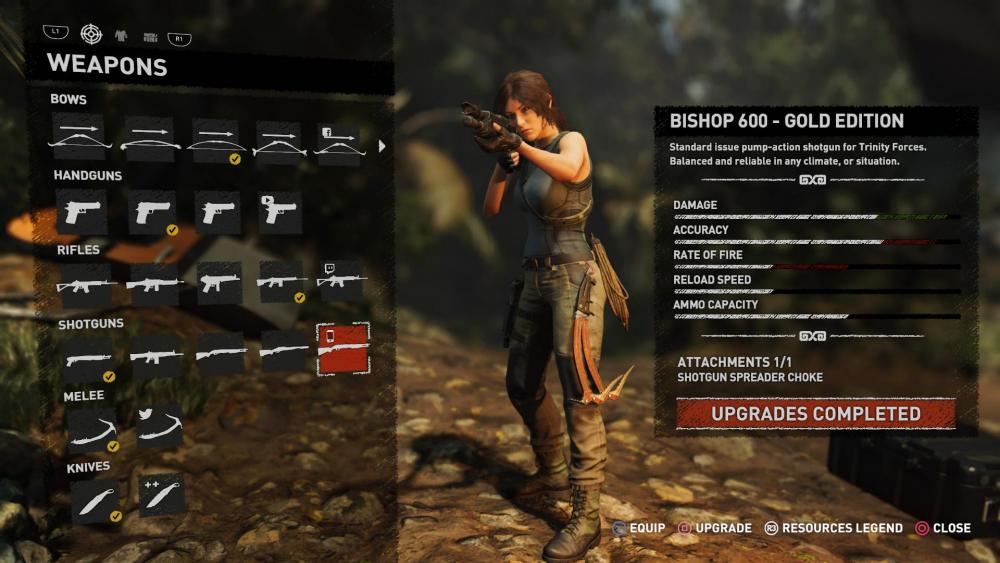
It's the Bishop 600 shotgun "Gold Edition". I don't think it shows up in the game until you unlock the shotgun since it's basically just a skin for that weapon. The Facebook, Youtube, and Twitch unlocks are golden versions of the Recurve Bow, AB .45 pistol, and Vicar Mark II rifle. Useless but fun.
-
It's just gorgeous, isn't it!? ?
-
I don't have the book, but someone emailed to tell me about this. Apparently, the section in the book about the Completionist Trophy/Achievement says you need to complete all Challenge Tombs and crypts; find all documents, relics, and monoliths; and complete all side missions and challenges. It does not say anything about survival caches, but I can confirm that you do, in fact, need the caches as well--at least in the PC version. When every region on the map says it's 100% complete, the achievement will unlock. You don't need to find all the explorer backpacks and archivist maps, but they will help you find the other items. Minor spoiler (not story related): It's going to be a while before I have walkthroughs for every level, but I've screencapped all my 100% area maps, so if you're having trouble finding anything, just give a shout. I'm happy to share. Hope everyone's having fun playing! ?
-
Excellent! Congratulations, @Lara_Croft! I had just finished the Mastabas when Crystal Dynamics very kindly sent me a review code for Shadow of the Tomb Raider, so I put everything else on hold to start working on that walkthrough. I will get back to TR4 eventually though. I'm so glad the walkthrough was helpful, even if the revised version was unfinished. Good job getting all the secrets!
-
Excellent! Congratulations, @Lara_Croft! I had just finished the Mastabas when Crystal Dynamics very kindly sent me a review code for Shadow of the Tomb Raider, so I put everything else on hold to start working on that walkthrough. I will get back to TR4 eventually though. I'm so glad the walkthrough was helpful, even if the revised version was unfinished. Good job getting all the secrets!
-
Cause I'm bossy that way. ? Anyway, a big LCO welcome to any new players, and welcome back to everyone who's been waiting for this game since they finished Rise. As Tom said in the forum guidelines, play nice and don't forget to tag your spoilers, since we all play at a different pace.
-
Aww! Thanks...and thanks! ?
-
@Tom@LCO (and other mods). Heya. It's almost that time. Just checking to make sure you'll be opening a sub-forums for Shadow Discussion and Shadow Help & Tactics. I suppose I could do it, but you're the boss. Maybe just reply to this when it's ready. I plan to link to both from my walkthrough-in-progress, since I'm sure everyone will be playing much faster than I can write. Maybe also pin a post about how to hide spoilers for those who might be tempted. Right! Let's go adventuring!
-
Haha! I don't know how anyone can play TR1 with a controller, but it was fun watching them suffer--and pee their pants when the T. rex appeared.
-
@kurlyak and @Tom@LCO, Thanks so much, guys! ❤️ I had a great birthday. My co-workers took me out for lunch, and my family is taking me out today. So yay! No cooking at least. And my husband made me an awesome wooden rack that attaches to the side of my gaming desk and holds my PS4 without blocking any of the vents. He's so handy!
-
I finished Cleopatra's Palaces yesterday. Yay! Alexandria is one of my favorite set of levels in the game. I still need to do a little tweaking and finish the chart showing how the Alexandria levels are interconnected. I'm still not sure what's the best way to present that info, so if anybody has ideas, I'd love to hear them. Basically, I want to include a table or flowchart that shows the bare-bones path you have to take through the different levels in order to get every crucial item. That way if people don't want a detailed walkthrough, they can refer to this if they get disoriented with all the back-and-forth. So far I've added more than 2,000 screenshots. I'm either brilliant or insane...or both. ? Not especially looking forward to Cairo, which I kinda hate, but I will persevere.
-
@kurlyak If you need any help, just let us know. Also, my revised walkthrough (sorry, English only) is here while I work on it: https://tombraiders.net/stella/walks/TR4revised/level-select.html. When it's finished, it will replace the original version.
-
OMG, my original Lost Library walkthrough is such a mess! I don't know how I left this revision on the back burner for so long. ? In spite of the climbing poles and blades and the mechanical men, this is still one of my favorite levels in the game. I love the planetarium room, and I still experience pride (and disgust) in the human race that built (and destroyed) the real library at Alexandria. Not sure if anybody is still playing, but I will continue to chip away....
-
No need to apologize, Blade. I hope everything turns out all right. I'm going very slowly--still in the Lost Library now--so if you get the urge to rejoin the group later on, you're more than welcome.
-
Excellent! I can't tell if it's due to the secure site or just people getting psyched up by E3 and wanting to catch up before the next game comes out, but my traffic has definitely been better in the last couple weeks. ? The only drawback is some eBay ads no longer work since there's no option to format their featured product banners with https. I hope they fix that soon. Everything else seems good though.
-
@Shrensh Yay! Congratulations! I'm just starting Lost Library. Little by little....
-
Haha! My advice was basically "I spent three days pulling my hair out over this, please don't do it." Good for you! :D
-
Same here. The game is looking pretty good, but I'm definitely going to need an upgrade. My gaming laptop has served me well for the last two TRs, but it's getting tired now. At least we have a few more months to figure things out. I'm sorry to hear about your dog. I hope everything goes well with the operation.
-
I don't think there is a level-skip cheat for this game, but I will see if I can find any other solutions. Just to elaborate a little on what I wrote before, the part where you wiggle the left stick from side to side does require you to do it more than once. You don't have to move it frantically, but you do have to go side to side repeatedly during that whole section where she's struggling for the gun and you see the left stick prompt on screen.
-
FWIW, you generally don't have to do it at as frantic a pace as the on-screen prompt seems to suggest. Good luck.
-
I got distracted by work-related stuff, not to mention all this Shadow of the Tomb Raider news, so I've been moving even more slowly through TR4 than before. I just finished the revisions for the Coastal Ruins (first visit) and Catacombs. For the Catacombs, I think I nailed down the triggers for the buggy medipack and shotgun ammo in the room with the first Trident, and I finally added the missed items in the alcove below the third Trident. About time, eh? The game's only been out 18+ years! ? @Tom@LCO (and anybody else who might be interested), I also spent last weekend shifting the entire site from HTTP to HTTPS. Yawn! ? I don't think I screwed up anything major, but I guess we'll see. I have no idea if it will make any difference going forward, but Google keeps telling me to get on the bandwagon. I figured if I'm going to lose search engine ranking during the transition, I want a little time to gain it back before Shadow comes out. ?
-
Hi. I moved this from the Rise of the Tomb Raider section to the TR 2013 section in case someone else might come looking for answers to this same question. I don't have the PS4 version, but I hope I can help. My full walkthrough with screenshots is at https://tombraiders.net/stella/walks/TR9walk/04-mountain-temple.html The first two button prompts require you to press Melee (Triangle on the PS4) to kick the Russian in the crotch, then Melee (Triangle) again to bite him. If you fail in either of these, he chokes Lara. If you succeed, she manages to knock his gun away and scramble after it, freeing her hands in the process. When you see the targeting reticle on screen, aim at him with the right stick and press Primary Fire (R2). Next, follow the prompts and wiggle the left stick back and forth from left to right to break free. For the next button prompt, tap Interact (Square) repeatedly as Lara struggles to keep her grip on the gun, then Primary Fire (R2) again to finish him off. If you fail, he shoots Lara and you have to try again. If you need more help w/ controls, you can download a PDF manual here: https://tombraiders.net/stella/gameplay.html or check out my list with notes here: https://tombraiders.net/stella/walks/controls/TR9controls.html Good luck!


LARA CROFT ONLINE TOMB RAIDER HOME PAGE
© Lara Croft Online All rights reserved. "Serving Tomb Raider Fans Since 2001"
Lara Croft ® and Tomb Raider ™ are trademarks of © CDE Entertainment Ltd. All rights reserved.