
Shrensh
ModRaider
-
Joined
-
Last visited
Everything posted by Shrensh
-
Hello funseeker, welcome to LCO Lots of people seem to have difficulty with this particular jump. Make sure that you are holding the jump button down the whole time Lara is in the air, as this makes her jump further. If you're playing on PC, some people have reported that lowering the resolution of the game helps, as well as turning off some of the graphics options while you're trying to make the jump.
-
That was pretty good; it must've taken a hang of a lot of patience to get right. I don't think I'm going to try it myself though, I definitely don't have the patience I actually have a patched version of a TR3 demo of Lara's mansion that has the quadbike out of the racetrack. It is rather fun to play around with.
-
Raider Man, you seem to have copied the wrong link into your post there. Do you have the link to the stuff about the quad bike that you wanted us to see?
-
You need an AMD Athlon XP processor or a Pentium 4 processor to run TR:A on a PC (link to the support section at Eidos). You can't download and install SSE, because it's a hardware issue, not a software one.
-
I have that too, courtesy of Stella after I won a competition on her website Thanks Stella!
-
Welcome yellowngreen and Lucas Adriel Machado
-
-
Welcome, DanMartin No one knows if or when there will be a new movie. There have been rumours of a third movie, but nothing at all has been confirmed.
-
We need far more information than that to help you. What Operating System are you using, what error messages are you getting if any, etc. I can offer a couple of guesses about your problem though. If you're on Vista and selecting "Install" from the Autoplay menu doesn't do anything, follow these instructions. If the installer is freezing on about 95% complete, just leave it there for as long as you can (it can take ages once it gets to 95%, even up to 20 minutes I've heard. It took so long when I installed that I was getting seriously worried that there was a problem with the game or my computer, but it did complete eventually). If it's gotten to 95% and is absolutely not installing, follow these instructions. If you're having a different problem to the above, please post back with specific details of your problem
-
Welcome back, Zikas / mr.kurtis
-
Awwwww, that is adorable I tried to teach my cats to play the piano once, but they just ran away when I put their paws on the keyboard
-
Welcome, Ashka Hope you enjoy yourself here
-
Personally, I've re-mapped the combat (target lock) key to shift, and the crouch/duck key to spacebar (and made the right mouse button jump). I keep the combat key pressed all the time using my little finger, so I have my other fingers free for the direction keys (WASD). Remember to keep Lara's guns pointed at the enemy at all times, or the move won't work. You can keep the combat and direction keys pressed all the time, but once the enemy's charge has started, only press crouch and shoot when you see the targets appear on the enemy, because if you do it too early the move won't work.
-
Hey TRF, welcome back! Good to see you around again
-
LOL, it's good to be appreciated
-
You're welcome I like that newest version of DOSBox on that site I linked to; I haven't had the game hang on me once since I started using it
-
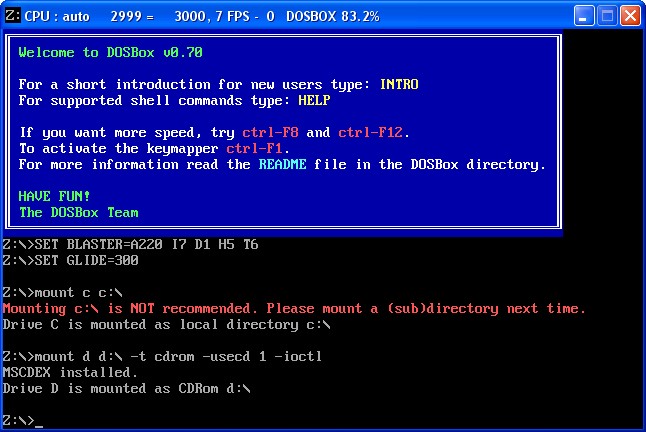
I can try to help you out... I don't know how familiar you are with DOS. It might be a bit confusing working with DOSBox if you're never worked in a DOS environment before. Go to this page, click on DOXBox CVS and download the latest version (I've just downloaded and tried the 6.16.2007 version and it works for me and seems a bit more stable than the version I was using before). Extract the files in the .rar file to a new folder. If you have a TOMBRAID folder left over from your earlier installation attempts, delete or re-name it, but keep the 853KB 3DFX tomb.exe file that came with the Advanced Installer because you'll be needing that. Go into the folder you just created with the extracted files in it, and look for a file called dosbox.config. Open it in Notepad and look for a line that says glide=false. Change that line so that it reads glide=true and then save. Double-click dosbox.exe to bring up the DOS window. Type mount c c:\ and press enter. That'll mount your C: drive in DOSbox and allow you to install the game onto the drive. Next type mount d d:\ -t cdrom -usecd 1 -ioctl and press enter. That'll mount your CD drive and allow the game to be installed from it (this is assuming that your CD/DVD drive is D:. If it has another letter, change that line to "mount d [whatever your drive letter is]:\ -t cdrom -usecd 1 -ioctl") Next, type d: and press enter. Then type install and press enter. A screen will come up that says TombRaider Setup with options Install and Exit. Use the arrow keys and Enter to select Install. Press enter on the next screen to keep the default installation directory. The next screen is the Sound Card Setup screen. Use the arrow keys to navigate up the list and select No Sound Card. On the next screen, select Sound Blaster Pro, on the screen after that select Port 220, after that select DMA 1, and then IRQ 5. Do NOT select "test" because that might cause the whole thing to hang. Just select Continue and Save Settings. Once the installation is completed and you end up back at the DOS prompt, you'll need to close DOSBox and go into your new TOMBRAID folder on your C: drive and copy the 853KB 3DFX version of tomb.exe into the install folder, replacing the smaller tomb.exe file that was already in there. Re-open DOSBox. This time instead of typing "mount c c:\", type mount c c:\tombraid. That'll mount your tombraid folder so you won't have to try and navigate through folders in DOSBox (plus it gets rid of that warning that DOSBox gives you when you mount the C: drive). Next mount your CD drive in the same way as before ("mount d d:\ -t cdrom -usecd 1 -ioctl"). Type c: and press enter, then type tomb. That'll start the game. If this works and you find you can run the game, and you only want to use DOSBox for Tomb Raider, you can open the dosbox.conf file and add the lines "mount c c:\tombraid" and below that "mount d d:\ -t cdrom -usecd 1 -ioctl" and then save. This'll make DOSBox automatically mount your TOMBRAID folder and CD drive every time you open it, so you only have to type "c:" and then "tomb" every time you want to play. You can get it to go fullscreen by opening the file "OpenGLid.ini" with Notepad and changing "InitFullScreen=0" to "InitFullScreen=1". You can also run Tomb Raider from a virtual drive using DOSBox, by mounting it as your D: drive, which is pretty useful. P.S. If you can't extract the .rar file that DOSBox comes in, download WinRAR to do it.
-
There's no legal issues with DOS emulators that I know of. There would be with a PlayStation emulator, because Sony owns the PlayStation bios you need to get it to work, but there are no such problems with DOS. I'm using DOSBox myself to run TR1 because I have hassles with dgVoodoo that I can't seem to fix. It was a mission to get it to work though, and the game has an annoying habit of hanging during FMV sequences, and it only runs at a very low resolution. If you can get the game to work properly with Glidos or dgVoodoo that would be better.
-
Yeah, that Glidos logo is pretty big. I don't recall if Lara crashed into it when I tried it though, I haven't used Glidos for a very long time. Have you tried using the Advanced Installer? I'd recommend that since it'll configure VDM Sound for you, install and configure dgVoodoo, and make sure you have the correct version of the tomb.exe file. You just have to install VDM Sound first.
-
Tomb Raider 1 sometimes gets called "Tomb Raider: The Atlantean Scion" by people, but that's not its proper name. So if you see someone calling it that, they're wrong. LOL
-
Welcome to LCO, CharismaticJinx!
-
Tomb Raider 1 is just called Tomb Raider, and it's about the Scion. Tomb Raider 1 is only called Tomb Raider: Gold when the extra four levels are added on. TR: Anniversary is a re-make of Tomb Raider 1 with the same story.
-
LOL, AngelR, I did that too during that level. Of course, it helped with the extreme irritation I felt whenever Lara fell off the pillars too
-
-
LOL, I tried all his tricks too but the best I got was the 1:09.2 in the screenshot there. I got bored with it though and stopped trying, because I have a short attention span (which is why I haven't completed any of the time trials in Legend or Anniversary )


LARA CROFT ONLINE TOMB RAIDER HOME PAGE
© Lara Croft Online All rights reserved. "Serving Tomb Raider Fans Since 2001"
Lara Croft ® and Tomb Raider ™ are trademarks of © CDE Entertainment Ltd. All rights reserved.